dewyser.net

solutions, scripting and more

Allow Carbon Black to run in background — 25th Apr 2025

Allow Carbon Black to run in background

With the profile earlier in the series, a admin user would be able to disable Carbon Black from running in the background and so, stop it from running all together.

So, let us add two extra options to the profile by adding a version.

Open the profile and look for “Login Items”. Here you want to add Carbon Black to the applications section.
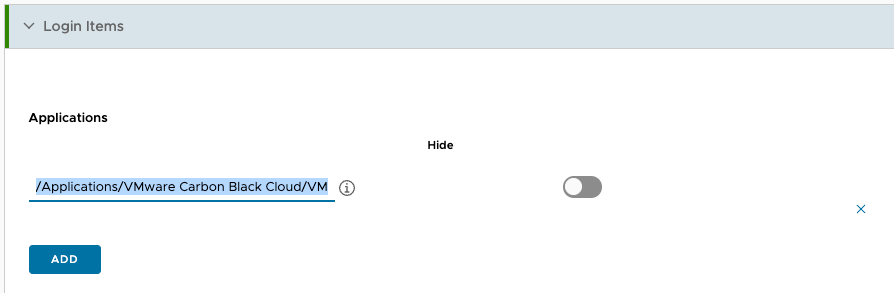
ex.: /Applications/VMware Carbon Black Cloud/VMware CBCloud.app

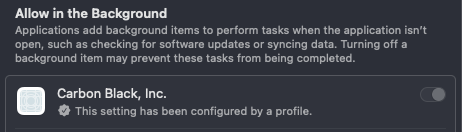
The second part is under the “Login and Background Items” section. Allow Carbon Black to run in the background based on the Team Identifier.

ex.: 7AGZNQ2S2T

For me, this resulted in an error and it seems to be a bug in the interface.

Go to the “System Extensions” section and remove the parts that are not in use. Heads up, they will get added again on saving the profile.

That’s it. Save and assign and you are good to go. Hope this helps!
Enable Carbon Black content filter on macOS — 26th Oct 2024

Enable Carbon Black content filter on macOS

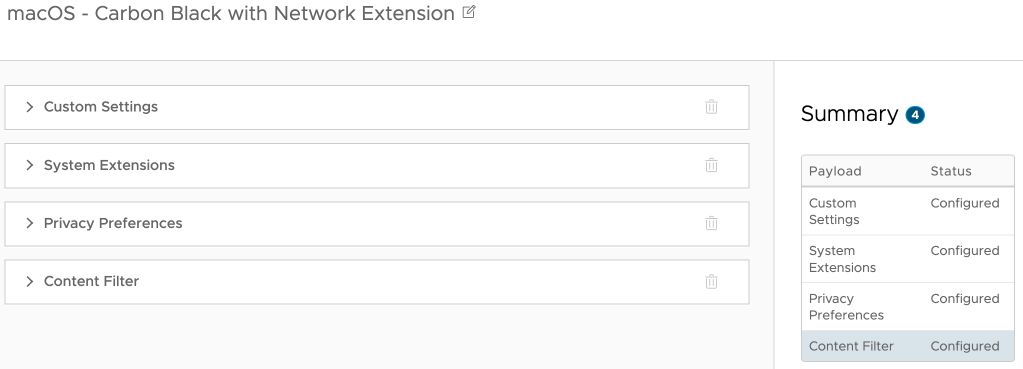
I recently came across a Workspace ONE UEM profile for Carbon Black that only had the system extension enabled. True, the first parts are maybe better documented, but to get the content filter working you also need to enable that, so in total you need 4 payloads:

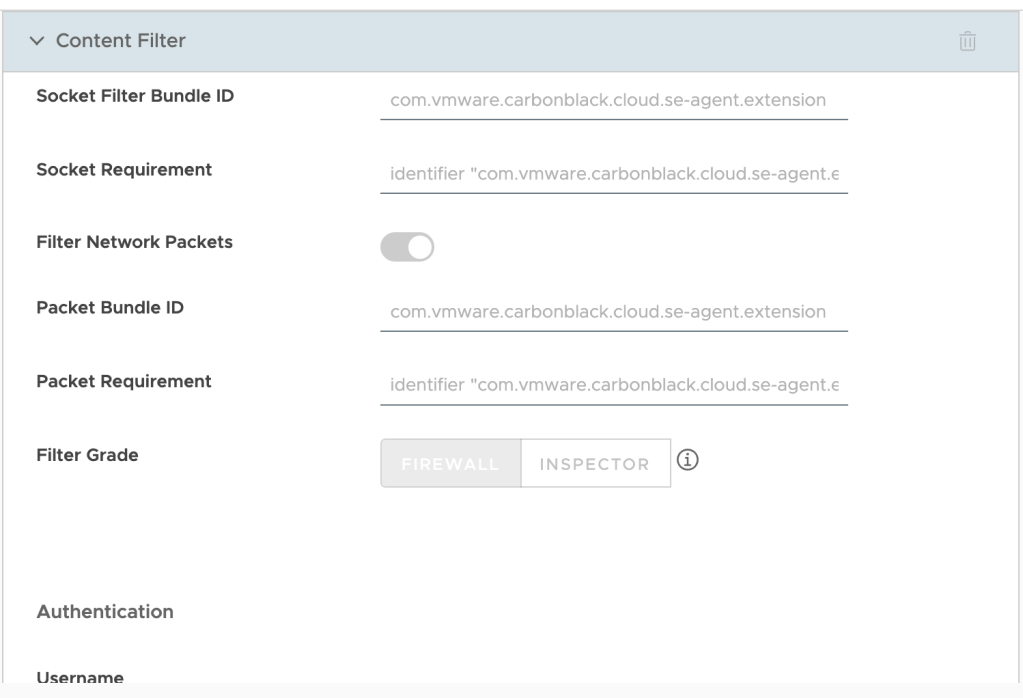
So, I made a copy of the profile and added the content filter part. Below the screenshot you’ll find the different parts to copy paste into the profile:

Filter type: Plug-in
Filter Name: VMware Carbon Black Cloud Network Extension Filter
Identifier: com.vmware.carbonblack.cloud.se-agent
Filter WebKit Traffic: Enabled
Filter Socket Traffic: Enabled
Socket Filter Bundle ID: com.vmware.carbonblack.cloud.se-agent.extension
Socket Requirement: identifier "com.vmware.carbonblack.cloud.se-agent.extension" and anchor apple generic and certificate 1[field.1.2.840.113635.100.6.2.6] /* exists */ and certificate leaf[field.1.2.840.113635.100.6.1.13] /* exists */ and certificate leaf[subject.OU] = "7AGZNQ2S2T"
Filter Network Packets: Enabled
Packet Bundle ID: com.vmware.carbonblack.cloud.se-agent.extension
Packet Requirement: identifier "com.vmware.carbonblack.cloud.se-agent.extension" and anchor apple generic and certificate 1[field.1.2.840.113635.100.6.2.6] /* exists */ and certificate leaf[field.1.2.840.113635.100.6.1.13] /* exists */ and certificate leaf[subject.OU] = "7AGZNQ2S2T"

You can validate the profile in macOS settings under Network > VPN & Filters > Filters & Proxies. There you should see the Carbon Black Content Filter as Enabled.

Querying Horizon Server API — 6th Aug 2024

Querying Horizon Server API

I recently was asked, how can we get a list of all the devices connecting to our environment and what client are they using to do so? With the help of the VMware.Hv.Helper I came up with the following in a couple of minutes:

function Get-ViewAPIService {
  param(
    [Parameter(Mandatory = $false)]
    $HvServer
  )
  if ($null -ne $hvServer) {
    if ($hvServer.IsConnected) {
      return $hvServer.ExtensionData
    }
  }
}

function Get-HVGlobalSession { 
  param(
    [Parameter(Mandatory = $false)]
    $HvServer = $null
  )
    
  $services = Get-ViewAPIService -HvServer $HvServer
  
  $query_service_helper = New-Object VMware.Hv.GlobalSessionQueryServiceService
  $query = new-object vmware.hv.GlobalSessionQueryServiceQuerySpec
    
  $SessionList = @()
  foreach ($pod in $services.Pod.Pod_List()) {
    $query.pod = $pod.id
    $queryResults = $query_service_helper.GlobalSessionQueryService_QueryWithSpec($services, $query)
    $GetNext = $false
    do {
      if ($GetNext) { 
        $queryResults = $query_service_helper.GlobalSessionQueryService_GetNext($services, $queryResults.id)
      }
      $SessionList += $queryResults.results
      $GetNext = $true
    } while ($queryResults.remainingCount -gt 0)
    $query_service_helper.GlobalSessionQueryService_Delete($services, $queryresults.id)
  }
  return $sessionlist
}

function Connect-HV() {
  param (
    [string] $HvServer,
    [string] $username,
    [securestring] $password,
    [string] $domain
  )

  $connection = Connect-HVServer -Server $HvServer -User $username -Password $password -Domain $domain -ErrorAction Stop

  return $connection
}

function Disconnect-HV() {
  param (
    [string] $HvServer
  )

  Disconnect-HVServer -Server $HvServer -ErrorAction Stop -Confirm:$false
}


$target_connection_server = "<connection server>"
$service_account_username = "<username>"
$service_account_domainname = "<domain>"
$service_account_password = ConvertTo-SecureString -AsPlainText "<password>" -Force

$connection = Connect-HV -HvServer $target_connection_server -username $service_account_username -password $service_account_password -domain $service_account_domainname

$sessions = Get-HVGlobalSession -HvServer $connection

$endpoints = $sessions.namesdata | Select-Object -ExpandProperty BaseNames
$endpoints | Format-Table UserName, ClientName, ClientVersion 

Disconnect-HV -HvServer $target_connection_server
Removing old agents in VMware Horizon VDI golden image — 5th Jan 2024

Removing old agents in VMware Horizon VDI golden image

The following script finds the uninstall strings in the registry and removes old agents from the golden image.

$execpolicy = Get-ExecutionPolicy

Set-ExecutionPolicy Unrestricted

$installed = Get-ItemProperty 'HKLM:\Software\Microsoft\Windows\CurrentVersion\Uninstall\*' | Where-Object {$_.UninstallString -match "MsiExec.exe"} | Select-Object DisplayName, DisplayVersion, UninstallString
$installed += Get-ItemProperty 'HKLM:\Software\Wow6432Node\Microsoft\Windows\CurrentVersion\Uninstall\*' | Where-Object {$_.UninstallString -match "MsiExec.exe"} | Select-Object DisplayName, DisplayVersion, UninstallString

$apps = @("VMware Tools","VMware Horizon Agent","VMware Horizon Agent Direct-Connection Plugin","VMware Dynamic Environment Manager Enterprise","App Volumes Agent","Microsoft FSLogix Apps")

$uninstall = $installed | Where-Object {($_.DisplayName -in $apps)}

$uninstall

foreach ($app in $uninstall) {
    $uninstcmd = $app.UninstallString

    $uninstcmd = (($uninstcmd -split " ")[1] -replace "/I","/X") + " /qn REBOOT=ReallySuppress"
    $uninstprc = Start-Process msiexec.exe -ArgumentList $uninstcmd -NoNewWindow -PassThru -Wait
}

$check = Get-ItemProperty 'HKLM:\Software\Microsoft\Windows\CurrentVersion\Uninstall\*' | Where-Object {$_.UninstallString -match "MsiExec.exe"} | Select-Object DisplayName, DisplayVersion, UninstallString
$check += Get-ItemProperty 'HKLM:\Software\Wow6432Node\Microsoft\Windows\CurrentVersion\Uninstall\*' | Where-Object {$_.UninstallString -match "MsiExec.exe"} | Select-Object DisplayName, DisplayVersion, UninstallString

$check | Where-Object {($_.DisplayName -in $apps)} | Format-Table

Set-ExecutionPolicy $execpolicy
Installing new Microsoft Teams in VMware Horizon VDI — 4th Jan 2024

Installing new Microsoft Teams in VMware Horizon VDI

The following script installs the new teams in the vdi golden image. If an old version is installed it removes it first. Afterwards a registry key is set to disable automatic updates.

The correct files can be downloaded here.

# get the current execution policy
$execpolicy = Get-ExecutionPolicy

Set-ExecutionPolicy Unrestricted

# location to the teams bootstrapper file
$bootstrapperpath = $PSScriptRoot + '\teamsbootstrapper.exe'

# allow execution of the teams bootstrapper file
Unblock-File -Path $bootstrapperpath

# check if teams is currently installed
$teamsversion = Get-AppxPackage -Name *MSTEAMS*

if ($teamsversion) {
    # if installed remove teams
    Write-Host 'Uninstalling Microsoft Teams version ' $teamsversion.version -ForegroundColor Red

    Start-Process -FilePath $bootstrapperpath -ArgumentList '-x' -Wait
    $teamsversion = ""
}

# location to the teams msix file
$msixpath = $PSScriptRoot + '\MSTeams-x64.msix'

# configure installation parameters
$args = '-p -o "' + $msixpath + '"'

# install teams
Start-Process -FilePath $bootstrapperpath -ArgumentList $args -Wait

# registry path
$registrypath = 'HKLM:\SOFTWARE\Microsoft\Teams'

# disable teams autoupdate 
if (!(Test-Path $registryPath)) {
    New-Item -Path $registrypath -Force | Out-Null
    New-ItemProperty $registrypath -Name 'disableAutoUpdate' -Value 1 -PropertyType DWord -Force | Out-Null
} else {
    if (!(Get-ItemProperty $registrypath -Name 'disableAutoUpdate')) {
        New-ItemProperty $registrypath -Name 'disableAutoUpdate' -Value 1 -PropertyType DWord -Force | Out-Null
    } else {
        Set-ItemProperty $registrypath -Name 'disableAutoUpdate' -Value 1 -PropertyType DWord -Force | Out-Null
    }
}

# check if teams installed correctly
$teamsversion = Get-AppxPackage -Name *MSTEAMS*

if ($teamsversion) {
    Write-Host 'Installed Microsoft Teams version ' $teamsversion.version -ForegroundColor Green
}

# set execution policy back to original value
Set-ExecutionPolicy $execpolicy